
|
|
| Home > Documentation > Configuring and administering > Configuring and administering the Apache Geronimo Server > Configuring the Web Container > Adding new listeners > Add new HTTPS listener |
To add a new HTTPS listener click on the link Tomcat|Jetty BIO|NIO|APR HTTPS Connector. The following figure illustrates some of the parameters possible for creating a new Tomcat BIO HTTPS listener. Each parameter has a default value and an explanatory text. Fill in with your values and click on Save.
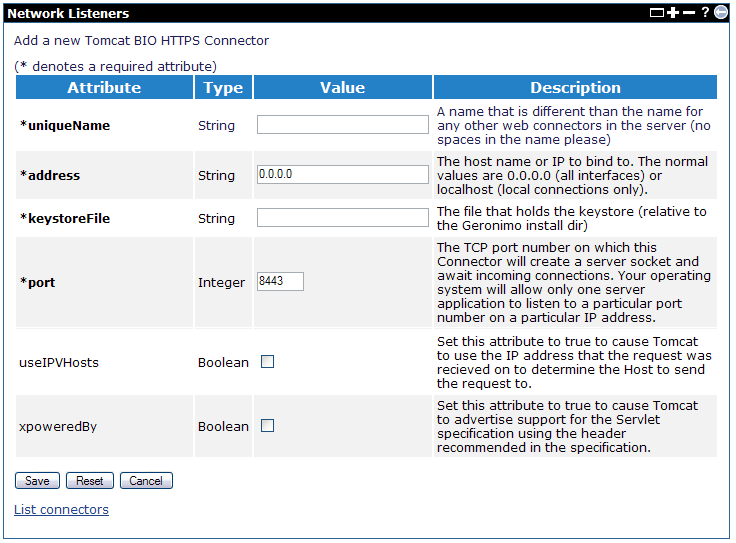
The required attributes are explained as followed:
Starting from v2.2, Geronimo uses server.xml to configure Tomcat. You need to update server.xml to use HTTPS Connector with APR enabled. Use the following code snippet as an example.
       <Connector name="TomcatWebSSLConnector"
                   port="${HTTPSPort + PortOffset}"
                   host="${ServerHostname}"
                   SSLEnabled="true"
                   maxThreads="150"
                   scheme="https"
                   secure="true"
                   clientAuth="false"
                   SSLCertificateFile="/usr/local/ssl/server.crt"
                   SSLCertificateKeyFile="/usr/local/ssl/server.pem"
                   sslProtocol="TLS"
                   executor="DefaultThreadPool"/>
Refer to Tomcat SSL Support for more information about other attributes.
 Bookmark this on Delicious
 Digg this
|
Privacy Policy - Copyright © 2003-2013, The Apache Software Foundation, Licensed under ASL 2.0. |


