|
| Home > Apache Geronimo v2.1 > Documentation > Developer's guide > Tutorials > Web services > Developing JAX-RPC Web Services |
This tutorial will take you through the steps required in developing, deploying and testing a Web Service in Apache Geronimo. After completing this tutorial you should be able to understand how to develop simple JAX-RPC compliant web services in Apache Geronimo using Eclipse development environment.
We also wont be focusing very much on developing client for JAX-RPC services as the client stubs generated are very close to that of JAX-WS.
| JAX-WS Web Services If you are new to Web Services, it is strongly recommended that you use JAX-WS 2.0 instead of JAX-RPC. JAX-WS 2.0 comes with many new features not supported by JAX-RPC. Theoretically JAX-RPC maps to J2EE 1.4 whereas JAX-WS maps to Java EE 5. So JAX-WS leverages the full potential of annotations and other new features which simplifies the application development a lot. |
| Migrating from JAX-RPC to JAX-WS If you are looking for how to migrate from JAX-RPC to JAX-WS, refer the following tutorial Migrating from JAX-RPC to JAX-WS. The above tutorial does not go into details on why these changes are required and the concepts behind it, it is rather a quick note that helps you to deal with migrating your application from the older web service stack to new stack. |
To run this tutorial, as a minimum you will be required to have installed the following prerequisite software.
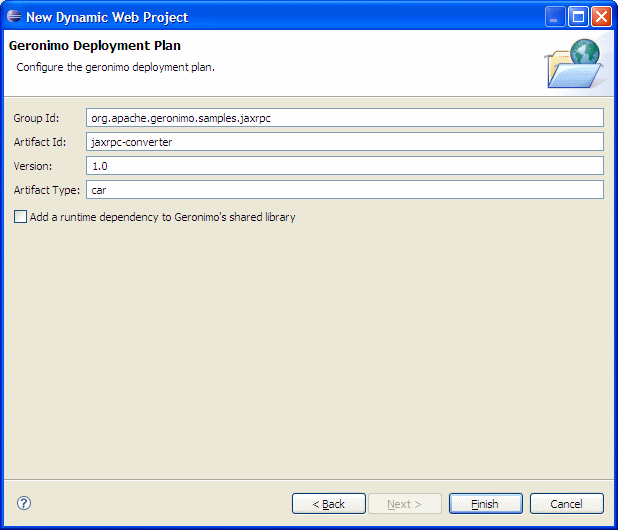
Details on installing eclipse are provided in the Development environment section. This tutorial will take you through the following steps:
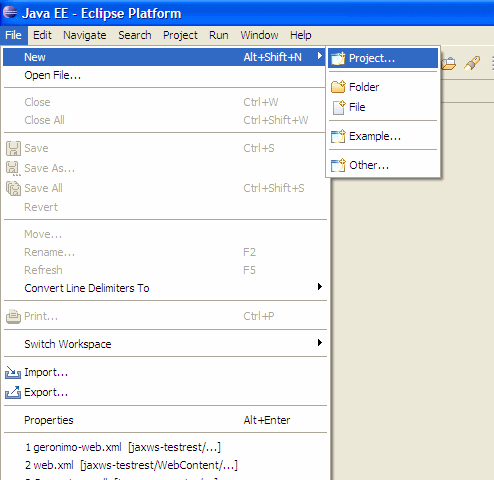
This completes the configuration of Eclipse for application development.
package org.apache.geronimo.samples.jaxrpc; import java.math.BigDecimal; import java.rmi.Remote; import java.rmi.RemoteException; public interface Converter extends Remote{ public BigDecimal dollarToRupees(BigDecimal dollars) throws RemoteException; public BigDecimal rupeesToEuro(BigDecimal rupees) throws RemoteException; }
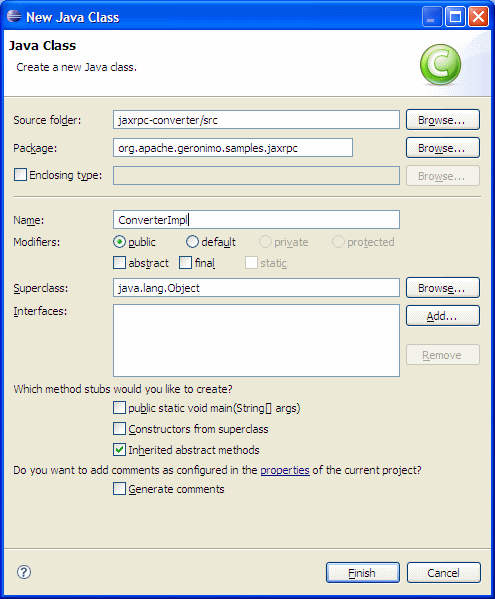
package org.apache.geronimo.samples.jaxrpc; import java.math.BigDecimal; import java.rmi.RemoteException; public class ConverterImpl implements Converter{ private BigDecimal rupeeRate = new BigDecimal("40.58"); private BigDecimal euroRate = new BigDecimal("0.018368"); public BigDecimal dollarToRupees(BigDecimal dollars) throws RemoteException { BigDecimal result = dollars.multiply(rupeeRate); return result.setScale(2, BigDecimal.ROUND_UP); } public BigDecimal rupeesToEuro(BigDecimal rupees) throws RemoteException { BigDecimal result = rupees.multiply(euroRate); return result.setScale(2, BigDecimal.ROUND_UP); } }
This completes the development of Web Services implementation code.
| Service Endpoint Requirement According to JAX-RPC specification, RPC Endpoint should extend Remote Class. |
| WSDL file As for JAX-WS services, WSDL file is automatically created by Geronimo at deploy time. There is no such facility for RPC services. |
<?xml version="1.0" encoding="UTF-8"?> <web-app xmlns:xsi="http://www.w3.org/2001/XMLSchema-instance" xmlns="http://java.sun.com/xml/ns/javaee" xmlns:web="http://java.sun.com/xml/ns/javaee/web-app_2_5.xsd" xsi:schemaLocation="http://java.sun.com/xml/ns/javaee http://java.sun.com/xml/ns/javaee/web-app_2_5.xsd" id="WebApp_ID" version="2.5"> <display-name>jaxrpc-converter</display-name> <servlet> <display-name>JAX-RPC Converter Service</display-name> <servlet-name>JAXRPCConverterService</servlet-name> <servlet-class> org.apache.geronimo.samples.jaxrpc.ConverterImpl </servlet-class> </servlet> <servlet-mapping> <servlet-name>JAXRPCConverterService</servlet-name> <url-pattern>/converter</url-pattern> </servlet-mapping> </web-app>
<?xml version="1.0" encoding="UTF-8"?> <wsdl:definitions xmlns="http://schemas.xmlsoap.org/wsdl/" xmlns:soap="http://schemas.xmlsoap.org/wsdl/soap/" xmlns:tns="http://org.apache.geronimo.samples.jaxrpc/" xmlns:x1="http://org.apache.geronimo.samples.jaxrpc/types" xmlns:wsdl="http://schemas.xmlsoap.org/wsdl/" xmlns:xsd="http://www.w3.org/2001/XMLSchema" targetNamespace="http://org.apache.geronimo.samples.jaxrpc/" name="Converter"> <wsdl:message name="dollarToRupeesRequest"> <wsdl:part name="in" type="xsd:decimal" /> </wsdl:message> <wsdl:message name="dollarToRupeesResponse"> <wsdl:part name="out" type="xsd:decimal" /> </wsdl:message> <wsdl:message name="rupeesToEuroRequest"> <wsdl:part name="in" type="xsd:decimal" /> </wsdl:message> <wsdl:message name="rupeesToEuroResponse"> <wsdl:part name="out" type="xsd:decimal" /> </wsdl:message> <wsdl:portType name="Converter"> <wsdl:operation name="dollarToRupees"> <wsdl:input message="tns:dollarToRupeesRequest" name="dollarToRupeesRequest"/> <wsdl:output message="tns:dollarToRupeesResponse" name="dollarToRupeesResponse" /> </wsdl:operation> <wsdl:operation name="rupeesToEuro"> <wsdl:input message="tns:rupeesToEuroRequest" name="rupeesToEuroRequest" /> <wsdl:output message="tns:rupeesToEuroResponse" name="rupeesToEuroResponse" /> </wsdl:operation> </wsdl:portType> <wsdl:binding name="ConverterSOAPBinding" type="tns:Converter"> <soap:binding style="rpc" transport="http://schemas.xmlsoap.org/soap/http" /> <wsdl:operation name="dollarToRupees"> <soap:operation soapAction="" style="rpc" /> <wsdl:input name="dollarToRupeesRequest"> <soap:body use="literal" namespace="http://org.apache.geronimo.samples.jaxrpc/"/> </wsdl:input> <wsdl:output name="dollarToRupeesResponse"> <soap:body use="literal" namespace="http://org.apache.geronimo.samples.jaxrpc/"/> </wsdl:output> </wsdl:operation> <wsdl:operation name="rupeesToEuro"> <soap:operation soapAction="" style="rpc" /> <wsdl:input name="rupeesToEuroRequest"> <soap:body use="literal" namespace="http://org.apache.geronimo.samples.jaxrpc/"/> </wsdl:input> <wsdl:output name="rupeesToEuroResponse"> <soap:body use="literal" namespace="http://org.apache.geronimo.samples.jaxrpc/"/> </wsdl:output> </wsdl:operation> </wsdl:binding> <wsdl:service name="ConverterService"> <wsdl:port binding="tns:ConverterSOAPBinding" name="ConverterPort"> <soap:address location="http://localhost:8080/jaxrpc-converter/ConverterPort" /> </wsdl:port> </wsdl:service> </wsdl:definitions>
<?xml version="1.0" encoding="UTF-8"?> <java-wsdl-mapping xmlns="http://java.sun.com/xml/ns/j2ee" xmlns:xsi="http://www.w3.org/2001/XMLSchema-instance" version="1.1"> </java-wsdl-mapping>
<?xml version="1.0" encoding="UTF-8"?> <webservices xmlns="http://java.sun.com/xml/ns/j2ee" version="1.1"> <webservice-description> <webservice-description-name>JAX-RPC Converter Service</webservice-description-name> <wsdl-file>WEB-INF/Converter.wsdl</wsdl-file> <jaxrpc-mapping-file>WEB-INF/jaxrpcmapping.xml</jaxrpc-mapping-file> <port-component> <port-component-name>ConverterPort</port-component-name> <wsdl-port>ConverterPort</wsdl-port> <service-endpoint-interface>org.apache.geronimo.samples.jaxrpc.Converter</service-endpoint-interface> <service-impl-bean> <servlet-link>JAXRPCConverterService</servlet-link> </service-impl-bean> </port-component> </webservice-description> </webservices>
This completes the setting up of Deployment Descriptor and Deployment Plans.
Let us walk through the files that we created.
<?xml version="1.0" encoding="UTF-8"?> <java-wsdl-mapping xmlns="http://java.sun.com/xml/ns/j2ee" xmlns:xsi="http://www.w3.org/2001/XMLSchema-instance" xmlns:Converter="http://org.apache.geronimo.samples.jaxrpc/" version="1.1"> <package-mapping> <package-type>org.apache.geronimo.samples.jaxrpc</package-type> <namespaceURI>urn:geronimo-samples</namespaceURI> </package-mapping> <service-interface-mapping> <service-interface> org.apache.geronimo.samples.jaxrpc.Converter; </service-interface> <wsdl-service-name> Converter:ConverterService </wsdl-service-name> <port-mapping> <port-name>ConverterPort</port-name> <java-port-name>ConverterPort</java-port-name> </port-mapping> </service-interface-mapping> <service-endpoint-interface-mapping> <service-endpoint-interface> org.apache.geronimo.samples.jaxrpc.Converter </service-endpoint-interface> <wsdl-port-type>Converter:Converter</wsdl-port-type> <wsdl-binding>Converter:ConverterSOAPBinding</wsdl-binding> <service-endpoint-method-mapping> <java-method-name>dollarToRupees</java-method-name> <wsdl-operation>dollarToRupees</wsdl-operation> <method-param-parts-mapping> <param-position>0</param-position> <param-type>java.math.BigDecimal</param-type> <wsdl-message-mapping> <wsdl-message> Converter:dollarToRupeesRequest </wsdl-message> <wsdl-message-part-name>in</wsdl-message-part-name> <parameter-mode>IN</parameter-mode> </wsdl-message-mapping> </method-param-parts-mapping> <wsdl-return-value-mapping> <method-return-value> java.math.BigDecimal </method-return-value> <wsdl-message> Converter:dollarToRupeesResponse </wsdl-message> <wsdl-message-part-name>out</wsdl-message-part-name> </wsdl-return-value-mapping> </service-endpoint-method-mapping> </service-endpoint-interface-mapping> </java-wsdl-mapping>
Now, we will look into the steps involved in deploying and testing our web service without any clients.
| WSDL File You can also view the WSDL file generated by Geronimo based on the annotations specified by going to the following url http://localhost:8080/jaxrpc-converter/converter?wsdl |
| Using Web Service Explorer in Eclipse You can also use Web Services Explorer present in Eclipse to rapidly test your web service without developing a client. To know how to use Web Services Explorer in Eclipse, one can refer to the Developing a JAX-WS POJO Web Service#Using Web Services Explorer in Eclipse |
| Client Development Client development is excluded from this tutorial because there is no big difference in creating a client for JAX-RPC Web Service and a JAX-WS Web Service. You can refer to Developing a JAX-WS POJO Web Service tutorial for further knowledge about how to develop a client for Web Services. |
The change you are required to do in the client jsp's are:
URL url = new URL("http://localhost:8080/jaxrpc-converter/converter?wsdl"); QName qname = new QName("http://org.apache.geronimo.samples.jaxrpc/","ConverterService"); ServiceFactory factory = null; Service service = null; try { factory = ServiceFactory.newInstance(); service = factory.createService(url, qname); } catch (ServiceException e) { e.printStackTrace(); } Converter conv = (Converter) service.getPort(Converter.class);
EJB JAX-RPC are very much similiar to POJO JAX-RPC we just implemented. Also the most important change between JAX-RPC and JAX-WS EJB Web service are the EJB anotations are not supported.
| EJB Classes These classes that are required by JAX-RPC are according to J2EE 1.4 standards (As JAX-RPC theoretically maps to J2EE 1.4). |
<ejb-jar xmlns="http://java.sun.com/xml/ns/j2ee" version="2.1">
<enterprise-beans>
<session>
<ejb-name>Converter</ejb-name>
<home>org.apache.geronimo.samples.jaxrpc.ConverterHome</home>
<remote>org.apache.geronimo.samples.jaxrpc.ConverterRemote</remote>
<service-endpoint>org.apache.geronimo.samples.jaxrpc.Converter</service-endpoint>
<ejb-class>org.apache.geronimo.samples.jaxrpc.ConverterBean</ejb-class>
<session-type>Stateless</session-type>
<transaction-type>Container</transaction-type>
</session>
</enterprise-beans>
</ejb-jar>
This completes the development of JAX-RPC Web Services. After completing this tutorial you should have a understanding about how JAX-RPC Web Services are deployed.
|
|
Privacy Policy - Copyright © 2003-2011, The Apache Software Foundation, Licensed under ASL 2.0. |