
|
| Home > Apache Geronimo v2.1 > Documentation > User's guide > Sample Applications > myphonebook - Very Simple Entity EJB Example |
This is an example of a JSP-page calling an Enity Bean that uses annotations. The result looks like this:
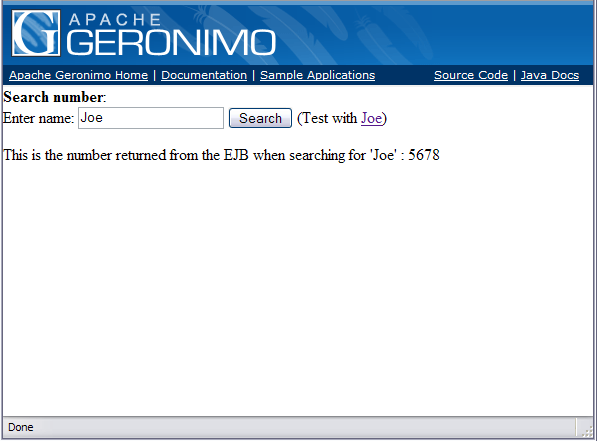
The primary purpose of the example is to provide a very simple demonstration of an EJB Entity bean. It is not intended to be a complete example or one that could be used as a template for creating your own EJB Entity bean. This is an example using Geronimo 2.1, Java 1.5 and EJB 3.0.
First, let us take a look at the PhoneBook Entity Bean that represents a table in the database. Each instance of PhoneBook is a record of the table.
PhoneBook.java uses the
And, as usual there is an empty constructor for the Entity Bean
package org.apache.geronimo.samples.myphonebookpak; import java.io.Serializable; import javax.persistence.Id; import javax.persistence.Entity; import javax.persistence.Table; @Entity @Table(name = "phonebook") public class PhoneBook implements Serializable { private String number; private String name; public PhoneBook() { } public PhoneBook(String name, String number) { this.name = name; this.number = number; } @Id public String getName() { return name; } public void setName(String name) { this.name = name; } public String getNumber() { return number; } public void setNumber(String number) { this.number = number; } }
MyPhonebookLocal.java is the business interface that drives the above mentioned Entity Bean.
package org.apache.geronimo.samples.myphonebookpak; import org.apache.geronimo.samples.myphonebookpak.PhoneBook; public interface MyPhonebookLocal { public PhoneBook findByPrimaryKey(String name); }
MyPhonebookBean.java is where the implementation of the local (and if there is, a the remote) interface exists. To explain what the annotations in this Stateless Session Bean means I will enumerate them:
| Note that PersistenceContext is used when you are directly obtaining a EntityManager. For an EntityManagerFactory use PersistenceUnit. |
package org.apache.geronimo.samples.myphonebookpak; import javax.ejb.Stateless; import javax.persistence.PersistenceUnit; import javax.persistence.EntityManager; import javax.persistence.EntityManagerFactory; import org.apache.geronimo.samples.myphonebookpak.PhoneBook; @Stateless public class MyPhonebookBean implements MyPhonebookLocal { @PersistenceUnit(unitName="PhonePU") protected EntityManagerFactory emf; public MyPhonebookBean() { } public PhoneBook findByPrimaryKey(String name) { EntityManager em = emf.createEntityManager(); PhoneBook phonebook = (PhoneBook)em.find(PhoneBook.class, name); em.close(); return phonebook; } }
index.jsp is the JSP page that uses the EJB to access the database.
<%@ page contentType="text/html" import="javax.naming.Context, javax.naming.InitialContext " %> <%@ page import="org.apache.geronimo.samples.myphonebookpak.MyPhonebookLocal" %> <%@ page import="org.apache.geronimo.samples.myphonebookpak.PhoneBook" %> <% String searchName = ""; if (request.getParameter("searchname") != null) { searchName = request.getParameter("searchname"); } %> <html> <head><title>Phonebook</title></head> <body> <form action="index.jsp"> <b>Search number</b>:<br> Enter name: <input type="text" name="searchname" value="<%=searchName%>"> <input type="submit" value="Search"> (Test with <a href="index.jsp?searchname=Joe">Joe</a>) </form> <% if (!searchName.equals("")) { String number = ""; try { Context context = new InitialContext(); MyPhonebookLocal myPhonebookLocal = (MyPhonebookLocal) context.lookup("java:comp/env/ejb/MyPhonebookBean"); PhoneBook phonebook = myPhonebookLocal.findByPrimaryKey(searchName); if (phonebook != null) { number = phonebook.getNumber(); } } catch (Exception e) { number = e.toString(); } out.println("This is the number returned from the EJB when searching for '" + searchName + "' : " + number); } %> </body> </html>
persistence.xml will specify the name of the PersistenceUnit. This name is used when referencing for the EntityManagerFactory. I have denoted it as PhonePU. I added an extra property called SynchronizeMappings so that the data in the database will not be overwritten.
<?xml version="1.0" encoding="UTF-8"?> <persistence xmlns="http://java.sun.com/xml/ns/persistence" xmlns:xsi="http://www.w3.org/2001/XMLSchema-instance" version="1.0" xsi:schemaLocation="http://java.sun.com/xml/ns/persistence http://java.sun.com/xml/ns/persistence/persistence_1_0.xsd"> <persistence-unit name="PhonePU"> <description>Phone Book</description> <provider>org.apache.openjpa.persistence.PersistenceProviderImpl</provider> <jta-data-source>SampleTxDatasource</jta-data-source> <non-jta-data-source>SampleNoTxDatasource</non-jta-data-source> <class>org.apache.geronimo.samples.myphonebookpak.PhoneBook</class> <properties> <property name="openjpa.jdbc.SynchronizeMappings" value="false"/> </properties> </persistence-unit> </persistence>
plan.xml is generated by building the sample and can be found under ./myphonebook-jetty/target/resources/META-INF/plan.xml to deploy on jetty or ./myphonebook-tomcat/target/resources/META-INF/plan.xml to deploy on tomcat following a successful build of the sample. Shown below is the deployment plan for tomcat.
<?xml version="1.0" encoding="UTF-8"?> <!--Licensed to the Apache Software Foundation (ASF) under one or more contributor license agreements. See the NOTICE file distributed with this work for additional information regarding copyright ownership. The ASF licenses this file to you under the Apache License, Version 2.0 (the "License"); you may not use this file except in compliance with the License. You may obtain a copy of the License at http://www.apache.org/licenses/LICENSE-2.0 Unless required by applicable law or agreed to in writing, software distributed under the License is distributed on an "AS IS" BASIS, WITHOUT WARRANTIES OR CONDITIONS OF ANY KIND, either express or implied. See the License for the specific language governing permissions and limitations under the License.--> <!--$Rev: 497879 $ $Date: 2007-01-19 12:11:01 -0500 (Fri, 19 Jan 2007) $--> <application xmlns="http://geronimo.apache.org/xml/ns/j2ee/application-1.2"> <dep:environment xmlns:dep="http://geronimo.apache.org/xml/ns/deployment-1.2"> <dep:moduleId> <dep:groupId>org.apache.geronimo.samples</dep:groupId> <dep:artifactId>myphonebook-tomcat</dep:artifactId> <dep:version>2.1-SNAPSHOT</dep:version> <dep:type>car</dep:type> </dep:moduleId> <dep:dependencies> <dep:dependency> <dep:groupId>org.apache.geronimo.samples</dep:groupId> <dep:artifactId>sample-datasource</dep:artifactId> <dep:version>2.1-SNAPSHOT</dep:version> <dep:type>car</dep:type> </dep:dependency> <dep:dependency> <dep:groupId>org.apache.geronimo.configs</dep:groupId> <dep:artifactId>jasper</dep:artifactId> <dep:version>2.1</dep:version> <dep:type>car</dep:type> </dep:dependency> <dep:dependency> <dep:groupId>org.apache.geronimo.configs</dep:groupId> <dep:artifactId>tomcat6</dep:artifactId> <dep:version>2.1</dep:version> <dep:type>car</dep:type> </dep:dependency> <dep:dependency> <dep:groupId>org.apache.geronimo.configs</dep:groupId> <dep:artifactId>openejb</dep:artifactId> <dep:version>2.1</dep:version> <dep:type>car</dep:type> </dep:dependency> </dep:dependencies> <dep:hidden-classes/> <dep:non-overridable-classes/> </dep:environment> <gbean name="DBInitialization" class="org.apache.geronimo.connector.DatabaseInitializationGBean"> <!--<attribute name="testSQL">select * from phonebook</attribute>--> <attribute name="path">PhoneBook.sql</attribute> <reference name="DataSource"> <name>SampleTxDatasource</name> </reference> </gbean> </application>
Please reference Samples General Information for information on obtaining and building the source for this and other samples.
If you choose to install the sample as a plugin it is not necessary to create or populate the database as this will be completed as part of the plugin installation. However, if you prefer to deploy the sample using the generated ear you must first install the sample-datasource plugin. You can use either the administration console plugin portlet or the command line install-plugin to install the sample-datasource. When you later deploy the sample the DBInitialization GBean included in the deployment plan will populate the database.
Use a command prompt to navigate into the myphonebook directory and just give mvn install followed by mvn site command to build. It will create the myphonebook-ear-2.1-SNAPSHOT.ear under the myphonebook folder. Now, you are ready to deploy myphonebook application in the Geronimo Application server using either the plugins generated for tomcat and jetty or the deployment plan that was generated and the ear.
As previously mentioned, there are two different ways to deploy the sample application - deployment as a plugin or deployment using the ear and plan.
To test the sample web application open a browser and type http://localhost:8080/myphonebook.
|
|
Privacy Policy - Copyright © 2003-2011, The Apache Software Foundation, Licensed under ASL 2.0. |